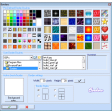
Simple painting editor with powerful tools
AvancePaint is a simple but powerful painting editor that gives you bunches of options when it comes to drawing on your computer.
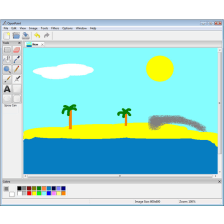
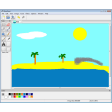
Admittedly, AvancePaint looks seriously out of date, and although the program is compatible with Windows Vista, its Help section is not. You shouldn't really let that bother you, however, as the program is easy to navigate and you'll be able to discover all the tools through trial and error.
AvancePaint is very much a painting editor and a simple one at that, so don't expect Photoshop-like miracles. Even so, it hides a number of interesting tools and effects, and you should be able to use it to produce very interesting art. AvancePaint will allow you to set your pictures as a wallpaper, create profiles and add effects like borders, frames and symbols.
AvancePaint is best thought of as a feature-packed alternative to Paint, and as such, it does a good job. Unfortunately, its appearance is pretty off-putting, but if you can get past that, you'll have a lot of fun creating pictures with AvancePaint.
Simple, feature-packed editing power for your pictures - AvancePaint.
New: Detailed Editing ModeNew: Snap to Grid!New in Tools: "Color Depth and Dither Control"-> Change color depth and/or dithering on selection or the entire image or parts!New: Hard Spray when using Air Brush tool (Old School type of spray can, Thanks Mike West for the tip)New: Export to BMP with Color Depth and Dither Control - (Pro-edition)New: Export and import PNG-files! (Pro-Edition)New look of the toolbar option buttons and major cosmetic changes throughout the programToolbar has some functions replaced for easeNew: Picture FramesNew: Option in Pencil "Smooth Edges" (raindrop icon)New: Option in Pencil-> Colormix pencil(s) gives now a smooth follow of color (gradient style) option to enable gradient style or scatteredUser color Pencil-tool gave wrong color: fixedNew: borders shows default fore- and background color used during paintingNew: "Set as Wallpaper" in menu Tools: create in one click a wallpaper on your desktop from your drawing
Changes
New: Detailed Editing ModeNew: Snap to Grid!New in Tools: "Color Depth and Dither Control"-> Change color depth and/or dithering on selection or the entire image or parts!New: Hard Spray when using Air Brush tool (Old School type of spray can, Thanks Mike West for the tip)New: Export to BMP with Color Depth and Dither Control - (Pro-edition)New: Export and import PNG-files! (Pro-Edition)New look of the toolbar option buttons and major cosmetic changes throughout the programToolbar has some functions replaced for easeNew: Picture FramesNew: Option in Pencil "Smooth Edges" (raindrop icon)New: Option in Pencil-> Colormix pencil(s) gives now a smooth follow of color (gradient style) option to enable gradient style or scatteredUser color Pencil-tool gave wrong color: fixedNew: borders shows default fore- and background color used during paintingNew: "Set as Wallpaper" in menu Tools: create in one click a wallpaper on your desktop from your drawing





















User reviews about AvancePaint
by Anonymous
A fairly good free paint program.
I tested the free AvancePaint for half an hour and I found it to be quite capable once you learn how to use it. It lacks natural brushes but you can compensate for that by using a combination of the tools and effects. The earlier reviewer said that the help file doesn't work in Windows Vista, but it it works. You just have to follow the instructions and update Vista with an update which allow you to use help files of the older type.Roger J. More